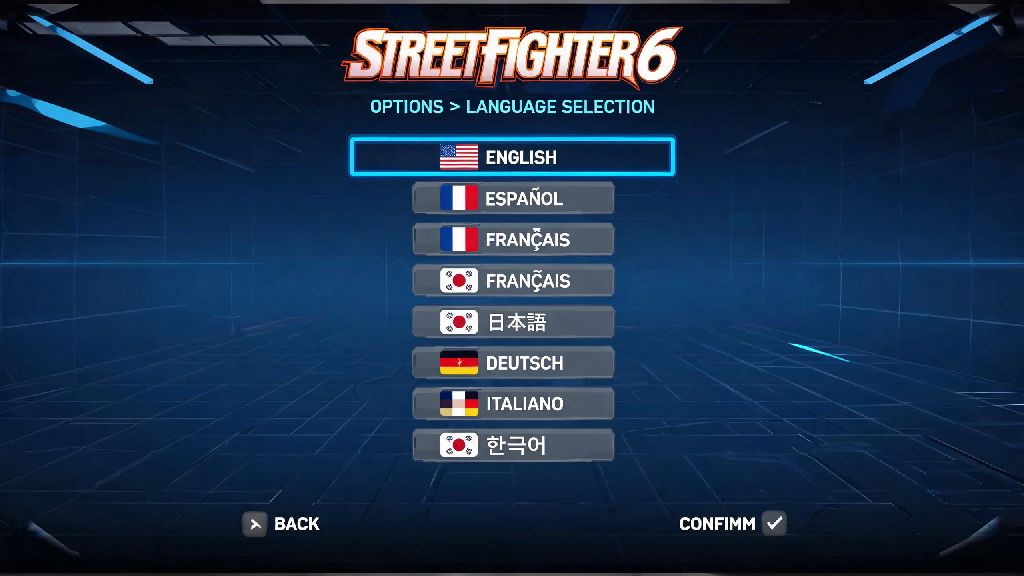
You just picked up a copy of Street Fighter 6 on import, or logged into your account while traveling abroad, and suddenly all the menu text is in a language you can't read? You're not alone. Tons of players run into this issue, especially if they share a console with family members or bought the game from a regional storefront. We've put together this tested walkthrough for how to change the language in Street Fighter 6, covering every major platform and common fixes for when settings won't stick. Even if you can't read the current menu text at all, you can follow our icon-based steps to adjust settings in seconds, no translation tool required.
How to Change the Language in Street Fighter 6 for All Platforms
The in-game menu path for adjusting language is nearly identical across PlayStation 5, Xbox Series X/S, PC, and Nintendo Switch, so you don't have to learn separate steps for each device. Even if the current text is unreadable, you can follow along by matching the icons we mention below, as they don't change across regions. Before you start, make sure you're logged into your main saved profile, not a guest account, to ensure your settings save correctly.
For PC players who can't even boot into the game menu to adjust settings, you can change the default language directly through your game launcher. On Steam, right click Street Fighter 6 in your library, select "Properties", then navigate to the "Language" tab to pick your preferred option. For Epic Games Store users, go to your game library, click the three dots under the Street Fighter 6 tile, select "Manage", then adjust the language setting there. Switch users should note that if their system language is set to a region not supported by the game, the in-game language option will be greyed out, so you'll need to adjust your Switch system language first to unlock the setting.
Adjusting Voiceover and Text Language Separately
A lot of new players assume they have to use the same language for both menu text and character voice lines, but that's not the case at all. Street Fighter 6 supports 13 text languages and 6 voiceover languages as of the latest update, so you have a lot of flexibility to customize your experience. You can mix and match settings to suit your preference, no mods or external tools required.
I've used this mixed setting for months to practice my French vocabulary while playing, keeping menu text and quest dialogue in French, but voice lines in English so I don't miss important story beats in World Tour mode. It's a fun way to pick up new words related to fighting games and everyday conversation, without sacrificing your ability to follow the plot. Keep in mind that some less common regional languages only have text support, no voiceover, so if you select a language and the voice lines stay the same, that's not a glitch, it's just that no dub exists for that language yet.
Common Language Setting Glitches and How to Fix Them
Even if you follow all the steps correctly, you may run into cases where your language settings won't save, or revert back to the default when you restart the game. Most of these issues are easy to fix with a few quick checks, no technical expertise required. Settings resetting every time you boot up the game on console? Double check that you changed the language on your main saved profile, not a guest profile. Guest profile settings don't carry over between sessions, so you'll need to log into your primary account to make permanent changes.
In-game language option greyed out? If you bought a region-locked copy of the game, some languages may be restricted based on your purchase region. You can usually work around this by adjusting your store account region to match the language you want, but note that this may affect your ability to buy DLC later, as DLC is region locked in most cases. If you're playing on PC and language settings won't save, make sure your game files are up to date, as early launch versions of the game had a bug that prevented custom language settings from saving. Verify your game files through your launcher to fix any corrupted files that may be causing the issue.
Best Language Settings for New Street Fighter 6 Players
If you're still not sure which language settings to pick, there are a few options that work especially well for new players still learning the game's mechanics. Stick to your native language for text if you're playing World Tour mode for the first time, to make sure you understand quest instructions, skill descriptions, and stat upgrades correctly. Missing a small detail in a special move description can cost you fights against tough opponents like Luke or Ryu in the open world, so it's not worth risking confusion for a different dub.
If you're a competitive player focusing on ranked matches, you don't need to worry about story text at all, so you can set voiceover to whatever you find least distracting. Some pro players even turn off voice lines entirely, but adjusting language is a good middle ground if you still want to hear character callouts but don't want them to pull your focus. If you plan to share gameplay clips online, picking a widely spoken language like English or Japanese for voice lines can help your clips reach a wider audience, as more viewers will understand the character lines and references.
At the end of the day, adjusting your game settings to be as comfortable as possible is one of the easiest ways to improve your experience playing Street Fighter 6. You don't have to stick to the default options just because that's what the game loaded with when you first booted it up. Now that you know how to change the language in Street Fighter 6, you can tweak the settings to match exactly what you want, whether that's a full localization or a mix of text and voice that fits your learning or play style. If you run into any issues we didn't cover here, you can always check the official game support page for the latest updates on supported languages and fixes.