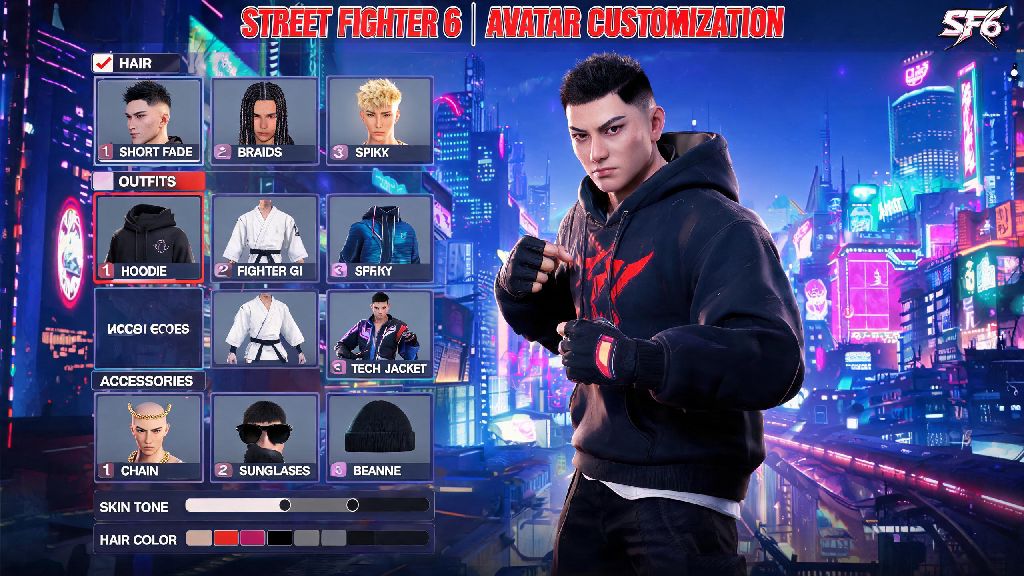
If you’ve spent hours grinding World Tour mode or hanging out in the Battle Hub, you’ve probably run into dozens of players with wild, unique avatars that make you want to tweak your own look. Maybe you picked a boring default haircut when you first booted up the game, or you just unlocked a rare new outfit you can’t wait to show off. Learning how to change your avatar street fighter 6 is way simpler than you might think, even if you’ve never dug into the customization menus before. You don’t have to restart your entire save or grind for special items to switch up your look, either—most basic changes are available as soon as you finish the opening tutorial.
How to Change Your Avatar Street Fighter 6: Step-by-Step Basic Walkthrough
You can edit your avatar from almost any screen in the game, no matter if you’re in the middle of a World Tour playthrough, waiting for casual matches, or sitting on the main menu. The process only takes a minute once you know where to look, and you can switch back to old looks whenever you want with no extra cost.
Note that you won’t lose any unsaved progress if you edit your avatar mid-World Tour session, but you will have to leave any active match queues first before you can access the customization menu. If you’re playing on a shared console, make sure you’re logged into the correct profile first, because avatar saves are tied directly to your user account.
Unlockable Avatar Customization Options You Might Have Missed
Most new players only use the default customization options available when they first create their avatar, but there are hundreds of hidden items you can unlock for free just by playing the game. You don’t have to spend premium currency to get cool, unique looks if you know where to look.
World Tour mode side quests are the easiest way to unlock rare customization items. Most NPCs you meet in the open world will give you exclusive outfits, haircuts, tattoos, or accessories once you max out your friendship level with them, or beat them in a specific sparring challenge. For example, beating Ryu three times in a row at his Mt. Fuji training ground gives you his classic white headband and gi top that you can mix and match with other outfit pieces.
Battle Hub limited-time events also drop exclusive customization items that you can’t get anywhere else. Holiday events, Capcom collaboration events, and tournament celebration events often give away free items like themed hats, emotes, and outfit sets just for logging in or winning a few casual matches. I once missed out on a rare neon racing jacket from a 2023 summer Battle Hub event, and I still haven’t seen it pop back up in the shop, so don’t sleep on limited-time drops when they’re available.
Tips for Making Your SF6 Avatar Stand Out Without Spending Real Money
A lot of new players assume you have to buy premium Fighter Coins to get a cool, unique avatar, but that’s not true at all. You can make a totally one-of-a-kind character using only free, unlockable items if you take a little extra time to play with the editing tools.
First, don’t just stick to the preset face options. The advanced face editing sliders let you adjust every detail of your avatar’s face, from jawline width to eye spacing to skin texture, so you can make a character that looks totally unique even if you use all default clothing. Most players skip these sliders entirely, so you’ll stand out from the crowd immediately if you take 10 minutes to tweak them.
You can also mix and match outfit pieces from different characters to create a unique vibe. Pair Chun-Li’s combat boots with Ken’s red hoodie and a custom face tattoo, or combine Blanka’s jungle shorts with Guile’s sunglasses for a silly, laid-back look. Don’t forget to adjust your avatar’s entrance animation and emote set too—those are the first things other players see when you join a Battle Hub lobby, and most of the funniest, coolest emotes are unlocked for free from World Tour side quests.
One common mistake new players make is adding too many accessories at once. Too many hats, necklaces, and face coverings can make your avatar look cluttered, and some accessories even clip through clothing during match animations, so test your look in a quick practice match before you save it.
Common Avatar Change Issues and How to Fix Them
Even if you follow the steps correctly, you might run into a few small glitches or issues when editing your SF6 avatar. Most of these problems have simple fixes that take less than a minute, so you don’t have to contact support or restart your save to fix them.
The most common issue is missing customization items that you know you already unlocked. If that happens, restart your game first—90% of the time, the item just didn’t sync correctly after you completed the quest or event that rewarded it. If it’s still missing after a restart, double check that you completed the full quest line for the item; some NPCs only give you the customization reward after you finish all their side quests, not just the first one.
Another common issue is your avatar not updating in the Battle Hub after you save changes. That’s almost always caused by lag in the lobby you’re currently in. Just switch to a different Battle Hub lobby, or exit and re-enter the mode, and your new look will load correctly for all other players.
If you’re playing on PC, be careful about using modded customization items when you play online. Modded items will only show up for you, and they can cause your avatar to reset to default for other players, or even get you a temporary ban from online play if Capcom’s anti-cheat flags the mod as a malicious file. Stick to official, unlockable items if you play online regularly to avoid issues.
At the end of the day, customizing your avatar is one of the most fun, personal parts of SF6, and you don’t have to be a pro to tweak your look whenever you want. Whether you’re going for a realistic vibe, a silly meme character, or a look that matches your main fighter, knowing how to change your avatar street fighter 6 lets you express yourself no matter what game mode you’re playing. Don’t be afraid to experiment with different looks, check for new unlockable items every time you play, and show off your unique style the next time you hop into a Battle Hub lobby.